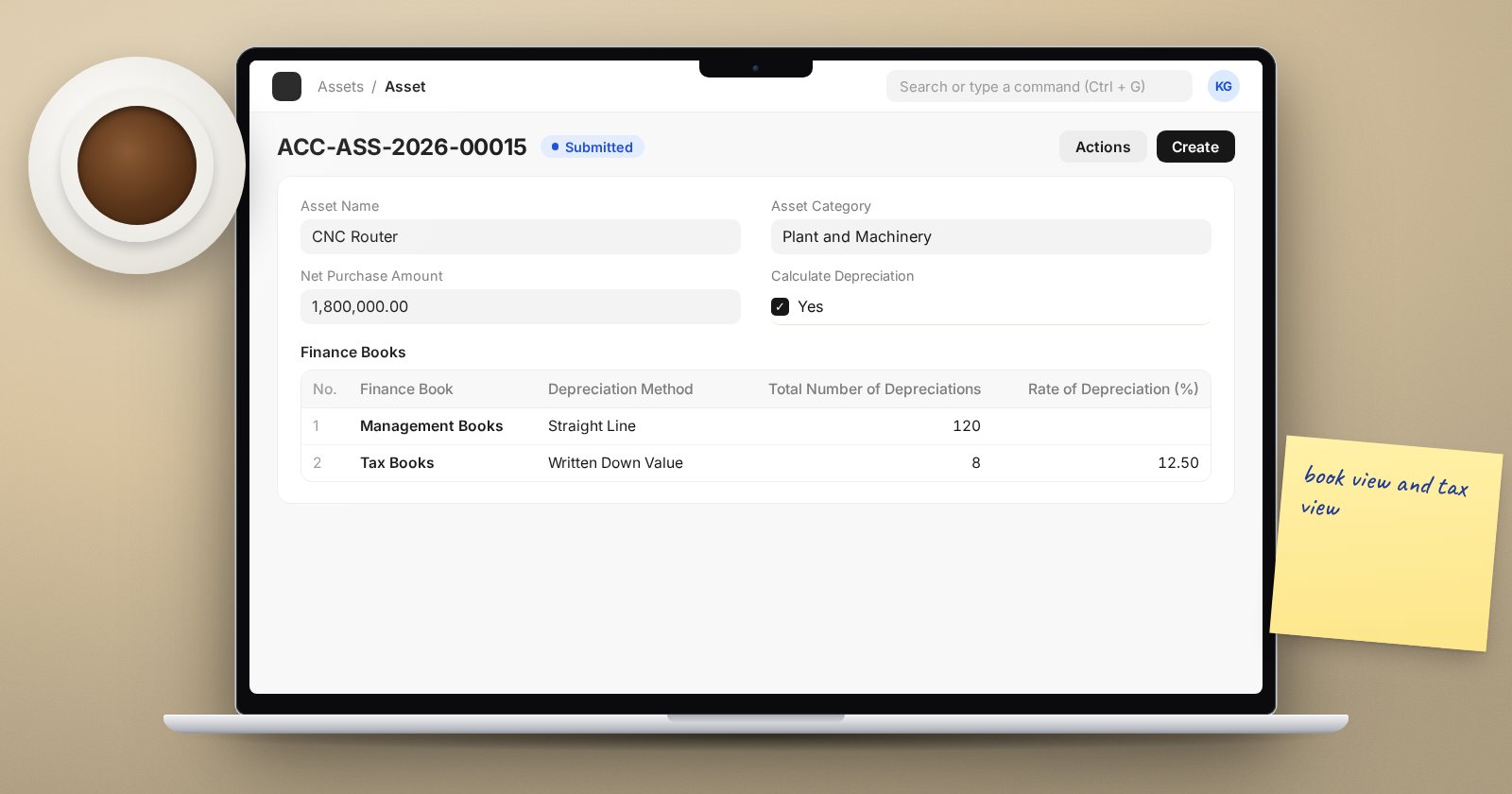
Your auditors want depreciation that reflects how long an asset is really used. The tax authority allows a different rate, set in law. Many companies run the second calculation in a spreadsheet every year. ERPNext can keep both on the asset itself using Finance Books, so each set of numbers comes from the same register.
What a Finance Book is
A Finance Book is simply a name, such as "Tax" or "IFRS". You attach it to depreciation rows and journal entries. Entries with no finance book belong to every view. Entries tagged with a finance book belong only to that book.
Create one from the Finance Book list. The only field is its Name.
On the Company, the Default Finance Book says which book is the main one for reports.
Two schedules on one asset
On the Asset, the Finance Books table can hold more than one row. Each row has its own:
- Finance Book
- Depreciation Method
- Total Number of Depreciations and Frequency of Depreciation (Months)
- Depreciation Posting Date
- Salvage Value, or Rate of Depreciation (%) for Written Down Value
For example, a computer could be depreciated straight line over 36 months in the main book, and in a "Tax" book at the rate your tax adviser specifies. Each row gets its own depreciation schedule.
The Asset Category has the same table, so set the rows once per category and new assets copy them.
What gets posted
When depreciation is booked, each schedule posts its own Depreciation Entry journal, with the journal's Finance Book field set to that row's book. So the ledger holds the main-book depreciation and the tax-book depreciation side by side, each tagged.
Purchases, invoices and payments have no finance book, so they appear in every view.
Reading the reports
The General Ledger, Trial Balance, Balance Sheet and Profit and Loss Statement all have a Finance Book filter and an Include Default FB Entries checkbox, ticked by default.
- Main view: leave Finance Book empty. You get untagged entries plus the default book.
- Tax view: choose the Tax book and untick Include Default FB Entries. You get untagged entries plus the tax book only.
If you pick a different book and leave the box ticked, ERPNext stops you with "To use a different finance book, please uncheck 'Include Default FB Entries'". That message protects you from adding two sets of depreciation together.
Keeping it clean
- Decide the default. The book your financial statements use should be the Company's Default Finance Book. If you leave the default empty, keep main-book rows without a finance book too.
- Be consistent per asset. Every asset in a category should carry the same set of books, or the tax view will be incomplete.
- Tag manual journals. A manual adjustment to depreciation should carry the right Finance Book on the Journal Entry. An untagged one changes every view.
- Check both views at month-end. Run the Trial Balance once per book and confirm accumulated depreciation matches the Fixed Asset Register for that book.
Is it worth it?
If you only need tax depreciation once a year for the return and the asset list is short, a working paper may be enough. Finance Books earn their place when you have many assets, several years of history, or a group reporting framework that differs from local books. The second view is then always up to date rather than rebuilt each year.
Try it
Create a "Tax" Finance Book, give one test asset two rows with different lives, and run the Trial Balance for each book. The difference in accumulated depreciation is the timing difference your tax adviser will ask about.
Finance books and multi-view reporting are covered in Accounting Professional.