
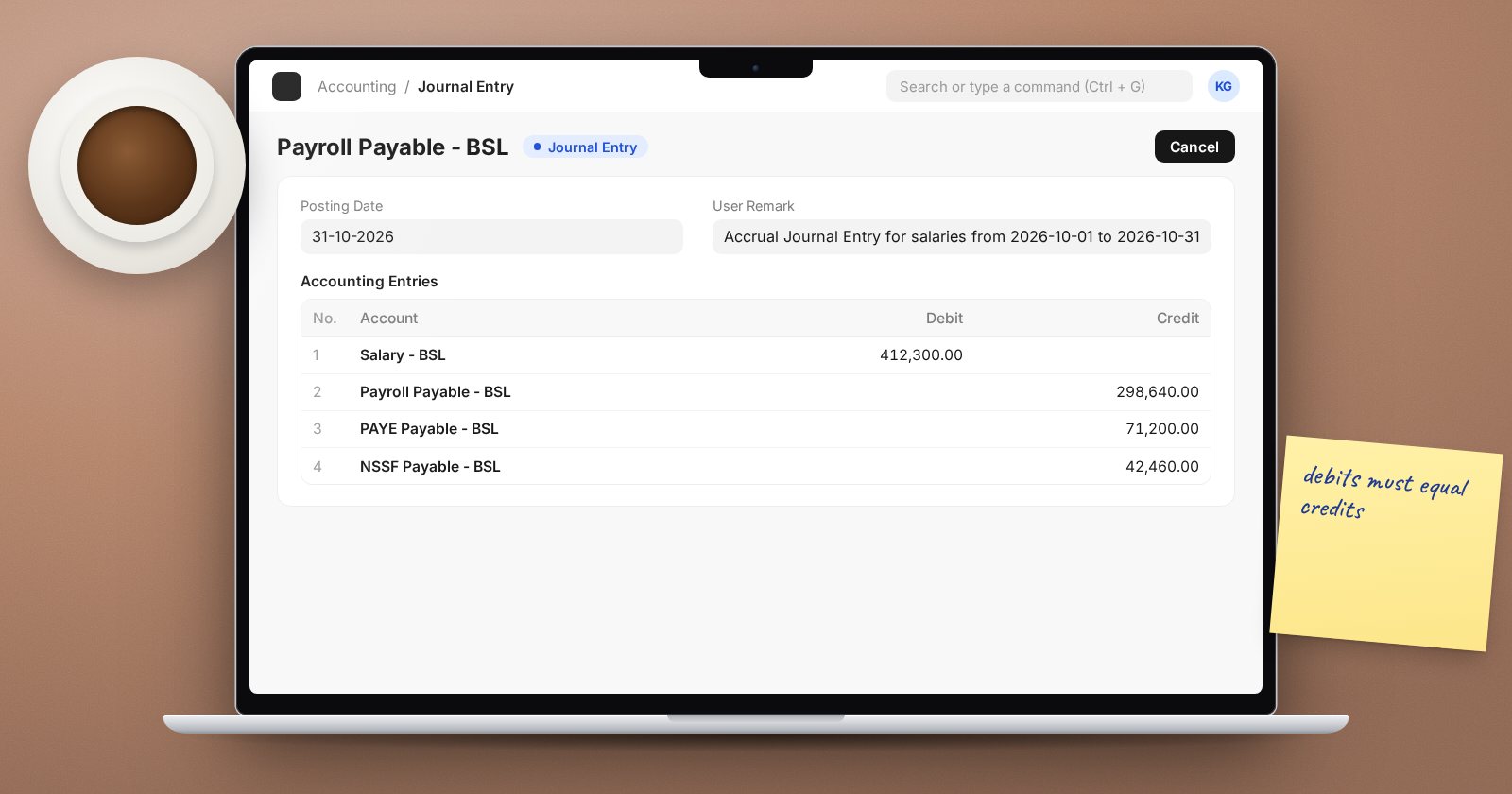
When a payroll run is submitted, ERPNext posts journal entries for you. Accountants need to know exactly what those entries contain, because they explain the salary expense in the profit and loss and the liabilities on the balance sheet. This article walks through the postings and the settings that control them.
The accounts you need
Agree these with finance before the first payroll:
- An expense account for each earning - basic salary, allowances, overtime and so on. Several components can share one account if your reporting does not need more detail.
- A liability account for each deduction - tax, pension, health insurance, loans, union dues. Each is money owed to someone else.
- For employer contributions, an expense account and a liability account.
- A payroll payable account - the net pay owed to staff until paid. ERPNext requires this to be an account of type Payable. Set a default on the Company under Default Payroll Payable Account.
Then, on each Salary Component, fill the Accounts table with the account per company. For Employer Contribution components there is also a Liability Account column.
Entry 1: the accrual journal
When salary slips are submitted from the Payroll Entry, ERPNext creates a Journal Entry:
- Debit each earning's expense account with the total of that component.
- Credit each deduction's account with the total of that component.
- Credit the payroll payable account with the net pay.
Debits equal credits because net pay is gross earnings minus deductions. Components marked Do Not Include in Accounting Entries are left out.
Entry 2: employer contributions
If the structure has Employer Contribution components, a second journal debits their expense accounts and credits their liability accounts. It does not touch net pay or the payroll payable account.
Entry 3: the payment
Make Bank Entry on the Payroll Entry creates a Bank Entry (or Cash Entry) that debits payroll payable and credits the bank or cash account. After it, the payroll payable balance for that run should be zero.
Entry 4: paying third parties
ERPNext does not create the payments to the tax authority, pension fund or other bodies. Finance pays each liability by its due date, with a Payment Entry or Journal Entry against the relevant account, so those balances clear too.
Cost centers
Component lines in the accrual journal are split by cost center using each employee's Salary Structure Assignment. Its Cost Centers table defaults from the Payroll Cost Center on the employee, or the department if the employee has none, at 100 percent. Split percentages there when one person works for more than one cost center.
Employee-wise payable
By default the payable line is one total. If you tick Process Payroll Accounting Entry based on Employee in Payroll Settings, payable lines are posted per employee with the employee as the party. That makes it easier to see what is still owed to each person, at the cost of longer journals.
Month-end checks
- Payroll payable for the period is zero after the bank entry.
- Each statutory liability account equals the matching column total in the Salary Register.
- Salary expense by cost center matches headcount by department.
Try it
After a test payroll run, open the accrual Journal Entry and list each account with its debit or credit. Match each line to a column in the Salary Register. If every line matches, your component accounts are set up correctly.
Payroll postings are covered in the Payroll course, and the wider ledger in Accounting Essentials.
